❓ Direct Staking FAQs
If you have further questions, please open a support ticket on our Discord and the team will be happy to help.
If you have further questions, please open a support ticket on our Discord and the team will be happy to help.

Direct Staking Basics
What Is Direct Staking?
Direct staking allows you to choose a specific validator and direct your vSOL toward them.
Instead of relying only on pool-level allocation (undirected stake), you can actively support a validator while still benefiting from the shared infrastructure of The Vault.
How Does Direct Staking Actually Work?
Once your wallet is assigned to a validator, all vSOL in that wallet is automatically directed to that validator.
The stake bot ensures that the selected validator receives the corresponding stake based on your vSOL balance. This happens continuously as your balance changes.
Do I Need to Select a Validator Before Staking?
It is not required. You can mint vSOL before or after selecting a validator. Once your wallet is assigned, all vSOL in your wallet will be directed to that validator automatically (Figure 3.20).
Can I Direct Stake Using SOL?
Direct staking only works with vSOL. You must first stake SOL to mint vSOL, and then that vSOL will be directed to your selected validator.
What Happens After I Stake SOL?
After staking SOL, you receive vSOL in your wallet. If your wallet is already assigned to a validator, that vSOL counts toward that validator’s stake, and the stakebot moves the actual stake to it over the following epochs.
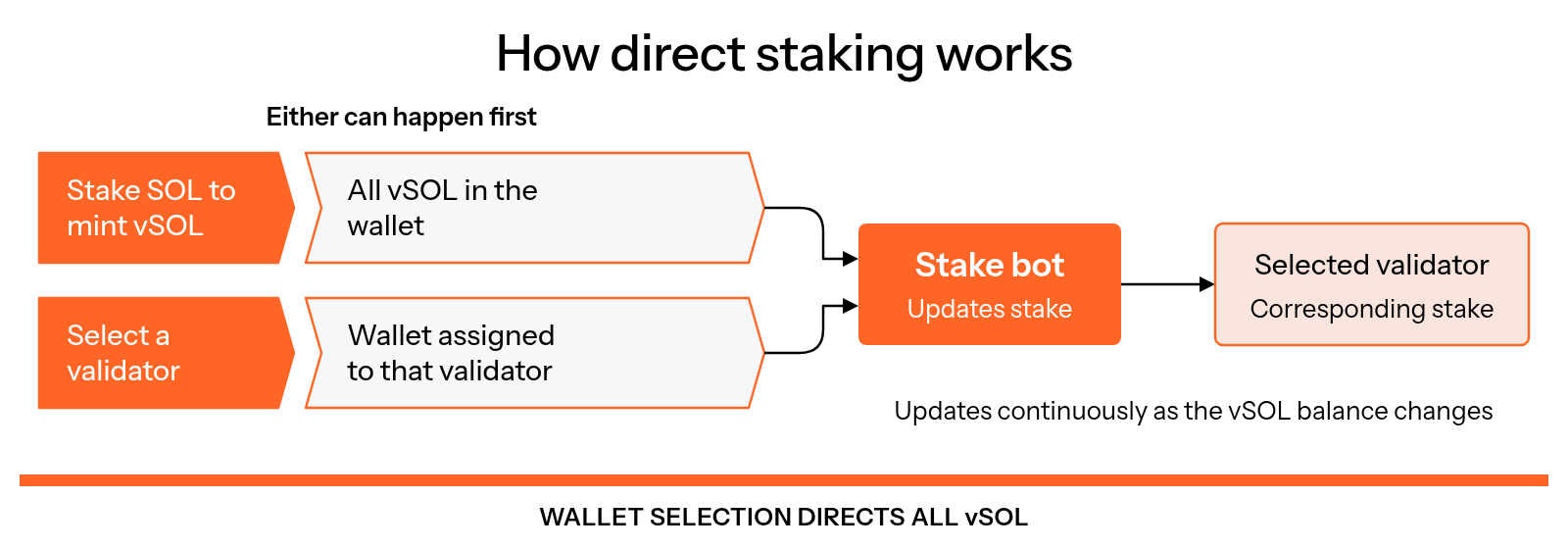
Figure 3.20: How direct staking works
Do I Choose How Much vSOL to Direct Stake?
No. You set your wallet to a validator once, and all vSOL in that wallet counts toward it, including vSOL you already hold. There is no amount to enter. To direct more, stake more SOL or add vSOL to that wallet.
Does My vSOL Still Count If I Move It Out of My Wallet?
It counts while it stays in that wallet or in a supported location, such as a Kamino Multiply position (see What counts as direct stake). If you sell or unstake vSOL, less stake goes to your validator. vSOL moved anywhere else becomes undirected stake until you move it back.
Changing Your Validator
Can I Change the Validator I’m Direct Staking To?
Yes, at any time. On the Direct Stake page, select the new validator, tap Direct Stake and approve the transaction. All vSOL in your wallet is then directed to the new validator.
Can I Direct Stake to More Than One Validator?
Not from one wallet. Each wallet is set to one validator at a time, so use a separate wallet for each validator you want to support.
Can I Remove My Validator Selection?
Yes. On the Direct Stake page, select Automatic delegation in the validator list, tap Direct Stake and approve the transaction. Your vSOL then becomes undirected stake, which The Vault's delegation strategy places.
Rewards and Kamino Multiply
Does Direct Staking Affect My Rewards?
Your base staking rewards come from the overall pool. However, if you use strategies like Kamino Multiply, your effective exposure increases, which can increase your overall APY. Please do your own research with the Kamino Multiply method, and understand that this is not financial advice.
What Is Kamino Multiply and How Does It Relate to Direct Staking?
Kamino Multiply allows you to leverage your staking position. For the steps, see How to use the Kamino Multiply strategy.
This works by looping: SOL → vSOL → borrow SOL → mint more vSOL → repeat (Figure 3.21).
A larger eligible vSOL position can direct more stake to your validator. Net returns depend on staking yield, borrowing costs and fees; leverage also adds liquidation risk. Read the Kamino Multiply risk disclosure.
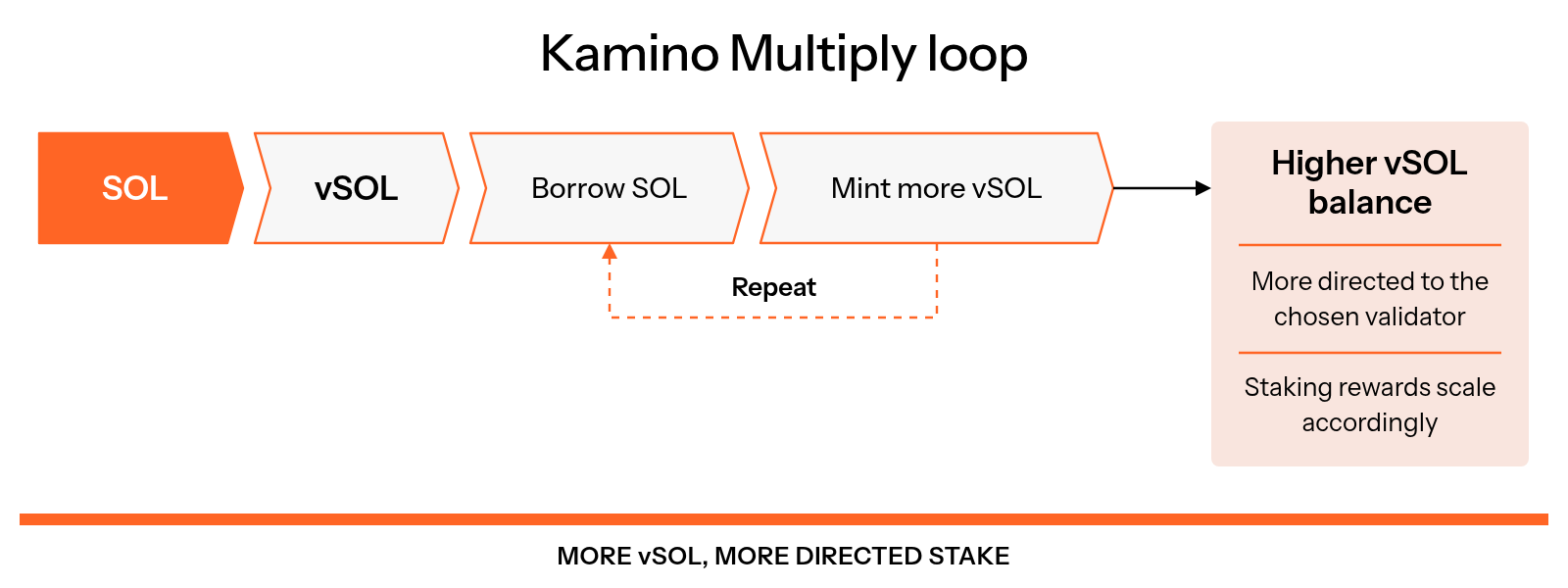
Figure 3.21: Kamino Multiply loop
Will I See My Leveraged Position in the Dashboard?
Your leveraged position through Kamino Multiply will appear in your Direct Stake dashboard once your wallet is connected, as long as you opened it from the wallet you set to your validator. It can take up to 24 hours to appear.
Validator Allocations and Transparency
Does Direct Staking Impact Validator Allocations?
Yes. Large direct stake positions can increase a validator’s share of total TVL within The Vault.
However, qualifying validators still receive equal baseline allocations from programs like:
Does the Validator I Choose Need to Be Approved by The Vault?
No. You can direct stake to any validator that meets The Vault's minimum requirements, including the commission limits of 5% commission and 10% MEV commission. Approved validators in the top 100 by direct stake also get a share of the Direct Stake Leaders bucket. For how the two kinds of stake differ, see Direct stake vs undirected stake.
Is Direct Staking Transparent?
Yes. All staking activity is fully on-chain and verifiable.
You can track validator allocations and stake distribution through:
- The Validators page
- Public Stakebot data
- Public holdings data
Getting Started
Is There a Minimum Amount Required to Direct Stake?
No. You can direct stake with any amount of vSOL. However, in order for the stake to show up on the validator dashboard, there must be a minimum of 1 SOL.
How Long Does It Take for My Direct Stake to Show Up?
Direct stake data updates about once a day, so new vSOL can take up to 24 hours to appear on the Direct Stake page. Your validator then receives the matching stake over the next few epochs, as the stakebot moves stake in steps. If nothing shows after a day or two, open a support ticket in The Vault Discord.
How Can I Check That My Direct Stake Is Set Up?
Connect your wallet on the Direct Stake page. The validator your wallet is set to appears under Currently delegated to, and Your vSOL holdings lists the vSOL that counts toward it, including Kamino positions.
Can I Direct Stake from a Squads Multisig?
Yes. On the Direct Stake page, choose the validator, then open Use with Squads Multisig to generate a transaction for your Squads vault. For the steps, see Multisig staking.
Where Do I Start?
Follow these steps. For a full guide with screenshots, see How to direct stake.
Open Direct Stake
Open The Vault dApp and go to the Direct Stake page.
Select a Validator
Under Choose a validator, search for your validator and tap it.
Set Your Wallet to the Validator
Tap Connect Wallet and choose your wallet, then tap Direct Stake and approve the transaction. Your validator appears under Currently delegated to.
Stake SOL
On the Stake page, stake SOL to mint vSOL. All vSOL in your wallet is directed to your validator automatically.
Still have questions? Open a support ticket in The Vault Discord and the team will be happy to help.