📦 Stake-as-a-Service (SaaS)
Compare main-bucket and Community Pool invoice rates, settlement tokens, payment methods and unpaid-invoice limits.
The Vault uses Stake-as-a-Service (SaaS) invoices for its Direct Stake Leaders, Elite Performance and Community Pool allocations. The fee rate and unpaid-invoice limit depend on which allocation generated the invoice. Direct stake is not charged these allocation fees.

Key Principles
- Sustainability: Introduces a fee structure to maintain and grow our operations.
- Fairness: Equal access to stake for approved validators, contingent on consistent subscription payments.
- Transparency: Invoices and payment statuses are tracked through our dApp.
- Simplicity: Fixed-rate system, with a payment bot that pays your invoices automatically.
Payment Terms
The two invoice categories have different terms:
| Allocation | Fee on its earnings | Unpaid-invoice limit |
|---|---|---|
| Direct Stake Leaders and Elite Performance | 25%, subject to the main-bucket exemptions. | Temporary transition allowance of 20 unpaid invoices. |
| Community Pool | 75%, funding rewards for pool delegators; the validator retains 25%. | Three unpaid invoices; pay within three Solana epochs to retain pool stake. |
Main-bucket invoices are issued one epoch after stake is received. Review each invoice's source and settlement token. Current invoicers can use vSOL or VLP; the new Community Pool contract accepts VLP only. The website and official bot support SOL funding for the required token.
Validator Board members' main-bucket exemption does not waive Community Pool fees. The temporary 20-invoice allowance gives main-bucket validators time to switch payment systems; it is not a permanent term or a Community Pool grace period.
The 25% main-bucket rate is calculated using the following formula: [((avg_mev_per_block × validator mev commission) + avg_rewards_per_block) × (stake by the vault ÷ avg_stake_per_leader_slot) + (stake by the vault × (chain inflation rate ÷ epochs per year) × validator inflation commission)] × 0.25 (Figure 7.17).
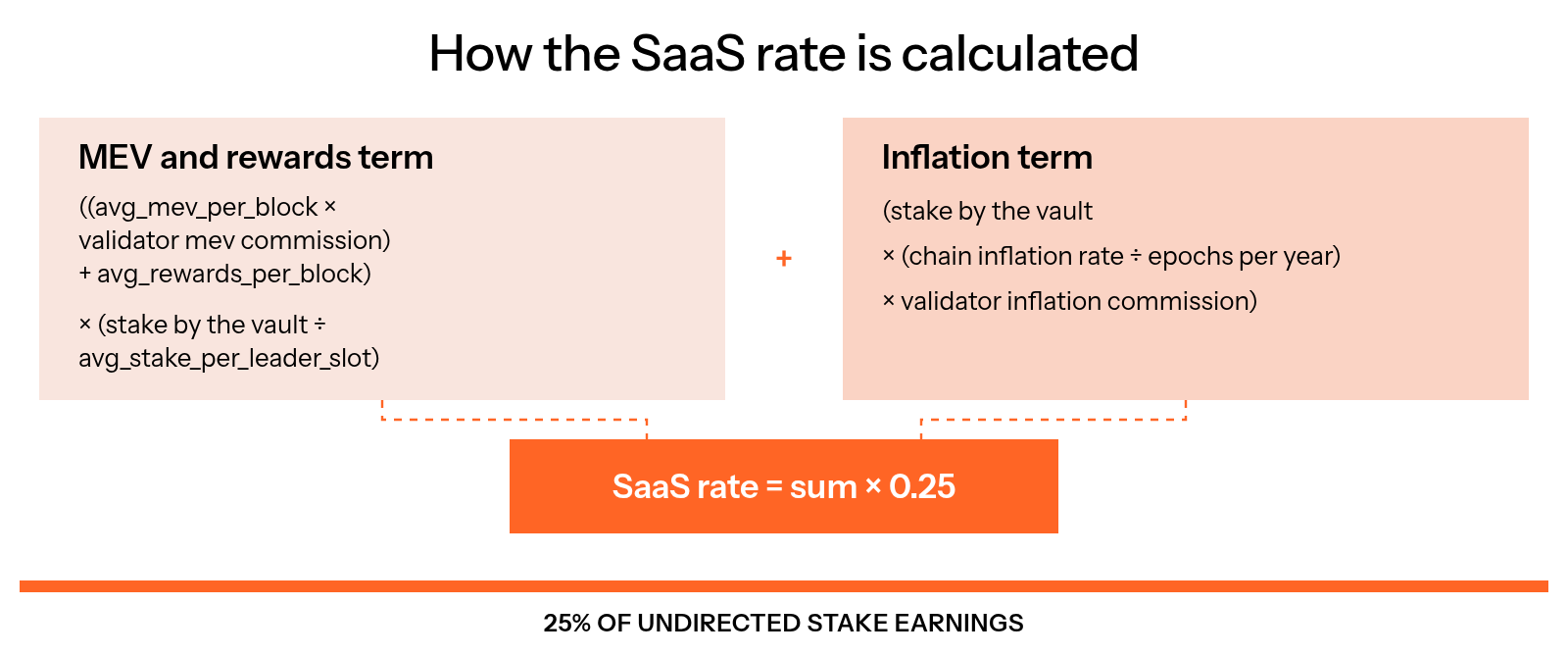
Figure 7.17: How the SaaS rate is calculated
Enforcement
At the temporary 20-unpaid-invoice main-bucket limit, the stakebot blocks Direct Stake Leaders and Elite Performance delegation until overdue invoices are settled. The validator remains on the approved list. Community Pool stake instead keeps the three-unpaid-invoice cap: the stakebot automatically blocks late pool validators and reallocates that pool stake to paying eligible validators (Figure 7.18).
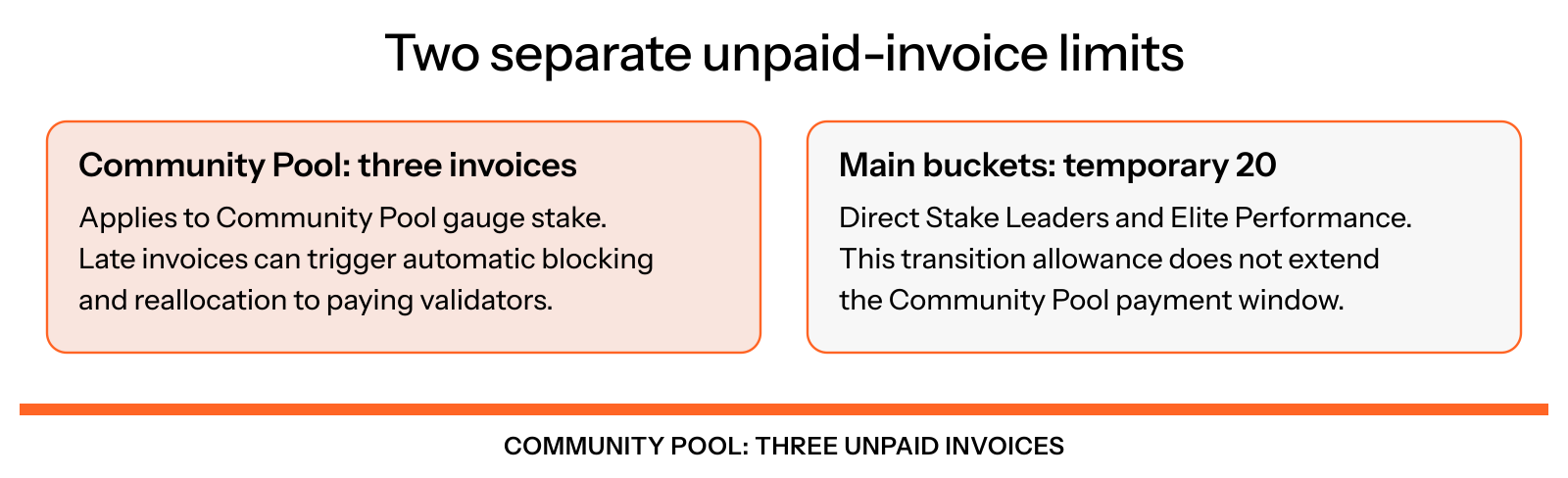
Figure 7.18: Separate invoice limits
Settle overdue invoices and check eligibility and subsequent allocation updates. Payment confirmation does not mean previously removed stake has already activated again.
Pay Your Fees Automatically
The Vault's SaaS payment bot checks for invoices once a day in your own GitHub Actions fork. It pays invoices from its trusted Vault invoicer list using each invoice's settlement token, currently vSOL or VLP. When needed, it uses SOL from the payer wallet to obtain that token. The payer wallet does not need to be connected to your validator. Update an existing fork or deployment for the Community Pool invoicer and VLP; custom bots must add the same support. The current bot confirms its funding transaction before submitting the separate invoice payment. Check settlement, not only funding success.
Fork the Repository
Sign in to GitHub and fork SolanaVault/saas-payment-bot to your account.
Add the Secrets
In your fork, open Settings, then Secrets and variables, then Actions, and add three repository secrets: RPC_URL with your RPC URL, PRIVATE_KEY with the payer wallet's private key in the [1,2,3,...] format, and VOTE_KEY with your validator's vote account public key.
Enable the Workflow
Open the Actions tab of your fork and enable workflows. GitHub turns them off in new forks until you do.
Keep the Payer Wallet Funded
Keep enough SOL in the payer wallet for invoice funding and transaction fees. Check Actions logs and your outstanding invoices: insufficient funds, RPC errors or configured run limits can leave invoices unpaid. See the repository README for current limits and configuration.
The bot needs the payer wallet's private key. Use a separate wallet that holds only the SOL for your invoices, never a wallet with your validator keys or other funds.
GitHub can pause scheduled workflows in a repository with no activity for 60 days. Check the Actions tab now and then, and push a commit at least every 60 days to keep the bot running. You can also run the bot in your own environment instead of GitHub Actions; the repository's README explains how.
Pay Your Fees Manually
You can also pay your invoices yourself on the validator dashboard.
Select Your Validator
Find your validator in the list and click on it.
Find Your Outstanding Fees
Find any outstanding epoch fees on your dashboard.
Connect Your Wallet
Connect your wallet to the site.
Pay the Fees
Click the Pay button. It shows how many invoices it pays, for example Pay 3 invoices.
Sign the Transaction
Sign the transaction using your wallet.
Check each invoice's settlement token and the payment quote before approving. The current payment system supports vSOL and VLP invoices, with SOL funding through the supported payment flow. For the new pool invoice flow and the three-epoch payment window, see Pay Community Pool invoices.
FAQ
What If I Don't Pay on Time?
Community Pool stake has a three-unpaid-invoice cap. The main Direct Stake Leaders and Elite Performance buckets have a separate temporary 20-invoice allowance. Late Community Pool stake is automatically reallocated to paying eligible validators. See Enforcement.
Can I Pay My Invoices Automatically?
Yes. Set up the SaaS payment bot: it checks for outstanding invoices once a day and pays them from a payer wallet you choose. See Pay your fees automatically.
Can an Invoice Be Paid Twice by Mistake?
An already-settled invoice cannot be paid again. Funding and payment are separate transactions, so a funding transaction can still leave vSOL or VLP in your payer wallet if payment is deferred or the invoice is settled by another run.
Why Do Some Validators Have No Stake-as-a-Service Invoices?
Main-bucket invoices apply to Direct Stake Leaders and Elite Performance allocations, with the Validator Board exemption for those buckets. Direct stake and manual gauge allocations outside the Community Pool are not charged the main-bucket fee. Community Pool allocations have their own 75% fee, so gauge stake must not be described as universally fee-free.
Can I Track How Much I Owe?
Yes. Validators can view current and past invoices on the dApp.
Is This System Permanent?
This is a pilot structure. The Vault may adapt the pricing or model based on validator feedback and protocol needs.
🏆 Elite Performance Bucket
How the Elite Performance bucket shares 50% of undirected stake among the top 50 approved validators by vote credits, and how to check your eligibility.
📚 Delegation FAQs
How direct stake, the main delegation buckets, gauges and the Community Pool affect validator allocations and fees.