✅ Approved validators
Welcome to The Vault: next steps for approved validators.
Congratulations on passing Validator Board review! You are now an approved validator of The Vault and eligible to participate in The Vault’s delegation programs. This guide explains what access you now have, how stake is allocated, and what you should expect next.

What approval unlocks
Approval does not mean you need to take immediate action. It means you are now eligible to receive delegation through gated programs and can fully participate across The Vault ecosystem.
You now have access to:
- Direct Stake Leaders bucket
- Elite Performance bucket
- Community Pool opt-in, subject to its registry, eligibility and invoice rules.
- Manual gauge participation, subject to the general gauge requirements.
- Directed staking via vSOL and Kamino Multiply
Stake allocation is handled automatically by the stakebot and updates every three hours.
Permissionless paths (already available)
These paths do not require board approval and may already be in use by your validator. Community Pool opt-in is a separate path for eligible validators already in the pool.
Directed stake via vSOL and Kamino
Any vSOL directed to your validator, from any wallet, counts toward your direct stake total. Multiple wallets and community contributors are supported.
Once approved, you can receive bonus delegation if you rank in the top 100 eligible approved validators by directed stake and meet the Direct Stake Leaders requirements.
Gauges
Each week, 10% of undirected stake is allocated via the gauge system.
You may:
- Lock $V to vote directly
- Invite holders to support your validator with their manual gauge votes.
Gauge participation is permissionless, provided minimum performance requirements are met.
Community Pool participation
Eligible validators already in the stake pool can opt in using an offline validator identity signature, with any ordinary wallet submitting the transaction. The pool shares its own gauge voting power equally among eligible opted-in validators. It wins a share of the gauge reserve, which is 10% of undirected stake (Figure 8.1).
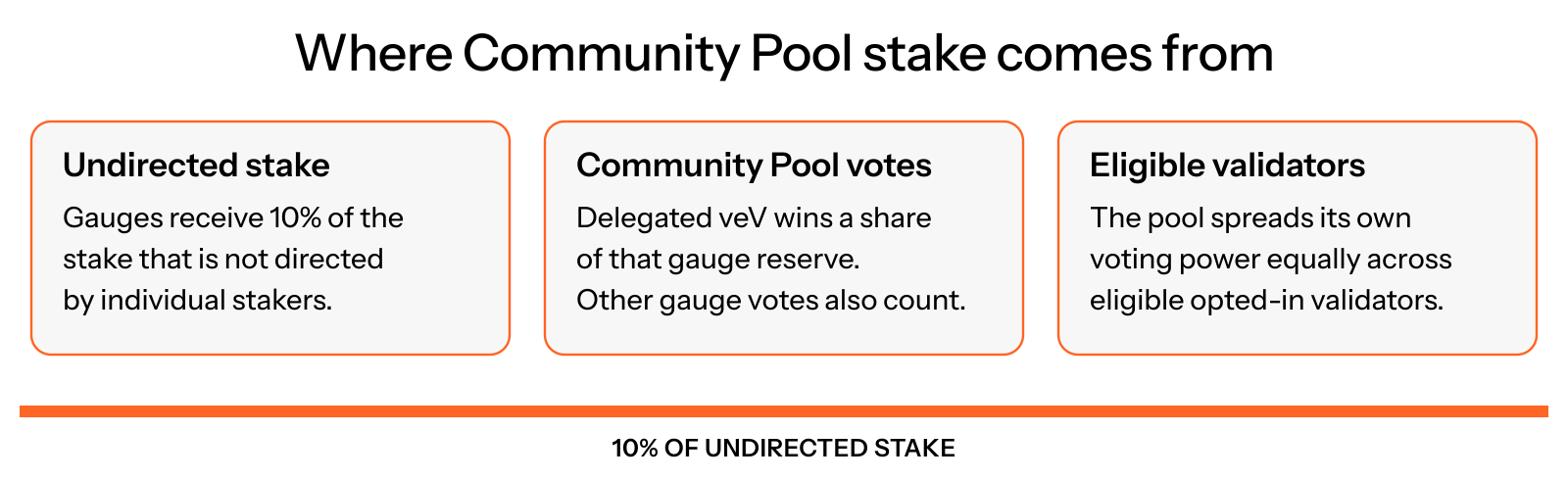
Figure 8.1: Community Pool gauge allocation
Community Pool participation requires invoice payments to remain eligible. It does not happen automatically just because the Validator Board approved you.
Board-gated delegation buckets
Once approved, you become eligible for the following programs.
Direct Stake Leaders bucket (40%)
The top 100 eligible approved validators by total directed stake through The Vault share 40% of undirected stake equally.
As an illustrative example, if the pool manages 1,000,000 SOL of undirected stake:
- 400,000 SOL is allocated to this bucket
- Each eligible validator receives ~4,000 SOL
Ranking within the top 100 does not change allocation size.
If you are already directing sufficient stake, there is nothing you need to do. The stakebot includes you automatically.
Open the validators page and select Direct Stake Leaders. The SOL floor card shows the current directed-stake cutoff for the top 100 eligible approved validators. The floor changes as positions change; check your rank and eligibility alongside it. See Direct Stake Leaders bucket.
Elite Performance bucket (50%)
The top 50 eligible approved validators, ranked by total vote credits over the last 10 epochs, share 50% of undirected stake equally. They must meet the delegation criteria and maintain 0% base and 0% MEV commission in every epoch of that window (Figure 8.2).
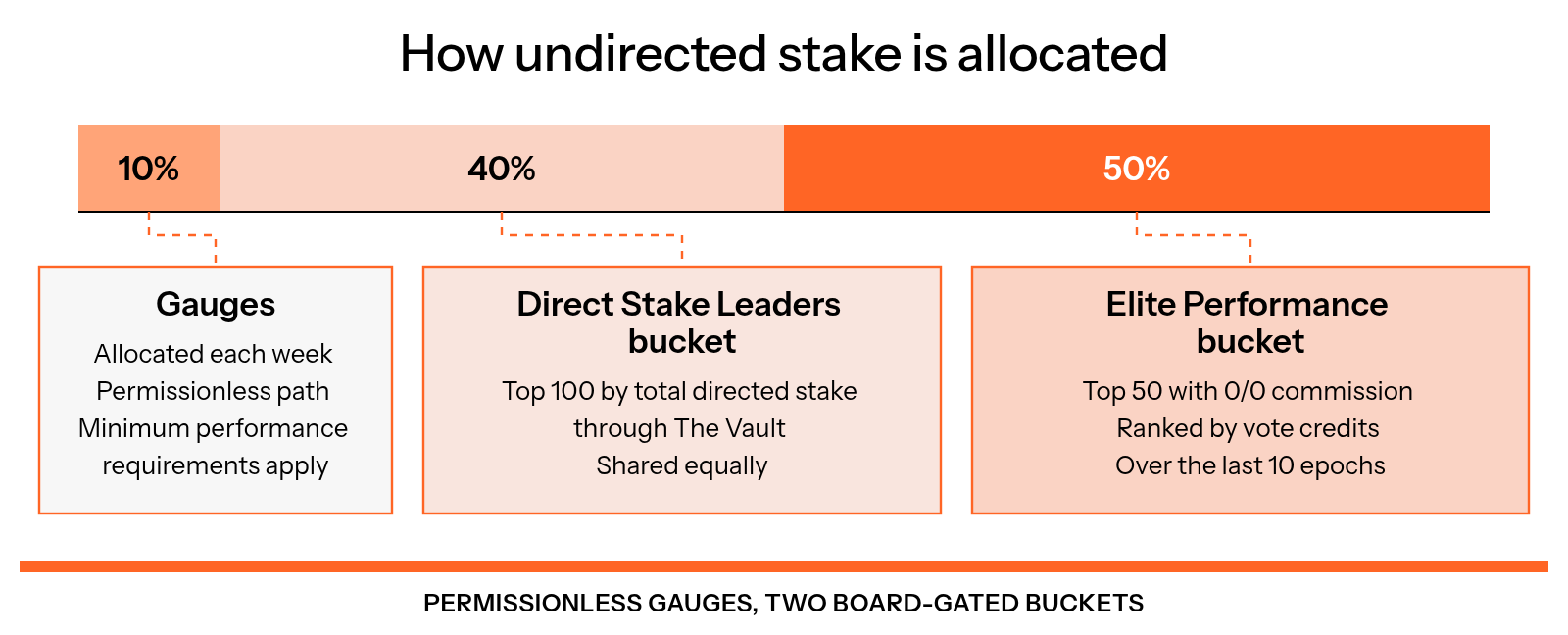
Figure 8.2: How undirected stake is allocated
Illustrative example:
- 500,000 SOL shared among 50 validators
- ~10,000 SOL per validator
This bucket rewards sustained performance, reliability, and long-term alignment.
Open the validators page and select Elite Performance. The vote credit floor card shows the current cutoff for the top 50 eligible approved validators by total vote credits over the last 10 epochs. See Elite Performance bucket for the commission and eligibility requirements.
Stake-as-a-Service fees
Delegation received from the Direct Stake Leaders bucket and the Elite Performance bucket is subject to Stake-as-a-Service fees. Community Pool allocations instead carry a 75% fee, with 25% retained by the validator (Figure 8.3).
Key points:
- Fee rate is 25% of earnings only
- Applies to earnings on the Direct Stake Leaders and Elite Performance allocations, subject to the documented exemptions.
- Direct stake, including self-directed vSOL and Kamino positions, is not charged this main-bucket fee. Community Pool gauge allocations have a separate 75% fee.
- Invoices are issued automatically and visible in the validator dashboard (click on your validator name)
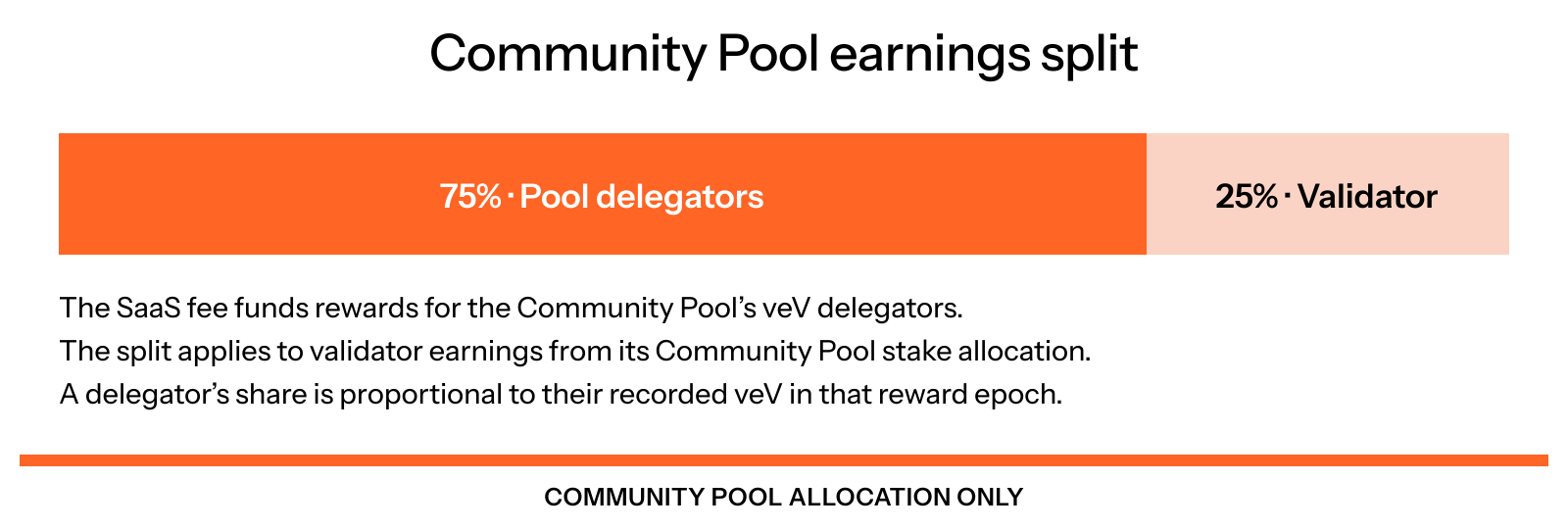
Figure 8.3: Community Pool earnings and fees
The temporary 20-unpaid-invoice allowance applies only to Direct Stake Leaders and Elite Performance. Community Pool stake keeps the three-unpaid-invoice cap; late pool stake is automatically reallocated. See payment terms.
Ongoing requirements
To remain eligible for board-gated delegation, validators must maintain:
- Good actor status (no harmful MEV or sandwiching)
- Base commission of at most 5%
- MEV commission of at most 10%
- Uptime of at least 97.5%
Eligibility is evaluated continuously. Raising your commission above 5% or your MEV commission above 10% (the Solana Foundation Delegation Program criteria), even for one epoch, can block your stake for 10 epochs.
What happens next
If you are already directing stake or meet bucket thresholds:
- The stakebot will pick you up automatically
- Updates occur every three hours
- Large stake movements may take several cycles
If you do not see stake immediately, check your eligibility, bucket rank, target breakdown and invoices on the validator dashboard. Approval alone does not guarantee an allocation.
Recommended next steps
- Verify your directed stake totals
- Review your validator dashboard
- Communicate your partnership with The Vault to your community
- Encourage your community to direct stake vSOL to you
- Consider gauges if strategically beneficial
Need help
If anything is unclear or you want to confirm your status, visit The Vault Discord and open a support ticket. The team is happy to help.