🛠️ Troubleshooting guide
Common issues and solutions for gauges and vote buying.
This guide lists common issues with gauges and vote buying on Votex, and how to solve them.

I created my gauge, but it is not visible yet
Your gauge may take up to 24 hours to fully come online.
I bought votes but do not see any delta
Possible causes
- Wrong epoch timing: check whether the new voting epoch has started on the Gauge cycle timeline of The Vault's Gauges page. Votes purchased apply to the next epoch, not the current one. Wait for the epoch rollover before expecting a delta.
- Not enough time has passed: deltas typically appear within three hours after the epoch begins. Allow up to six hours before assuming there is an issue. Continue checking https://thevault.finance/validators.
- Wrong validator selected: confirm that votes were purchased for the correct validator address. Review your Votex transaction history for verification.
Solution
Wait for the epoch to begin, then check for your delta within three to six hours.
I see a delta but no stake on my validator
This is expected behavior.
What the delta means
A visible delta indicates that your validator is in the priority queue. The stakebot processes this queue over time, prioritizing gauge stake over undirected stake (Figure 9.19). First time or large stake movements may take slightly longer.
Timeline expectations
- Typical distribution completes within 1 to 2 Solana epochs after the new gauge epoch starts.
- First time participants may experience slightly longer delays.
- Repeat participants usually see faster redistribution.
What to verify
- Confirm the delta appears at https://thevault.finance/validators.
- The stakebot runs every three hours.
- Gauge stake is treated as high priority.
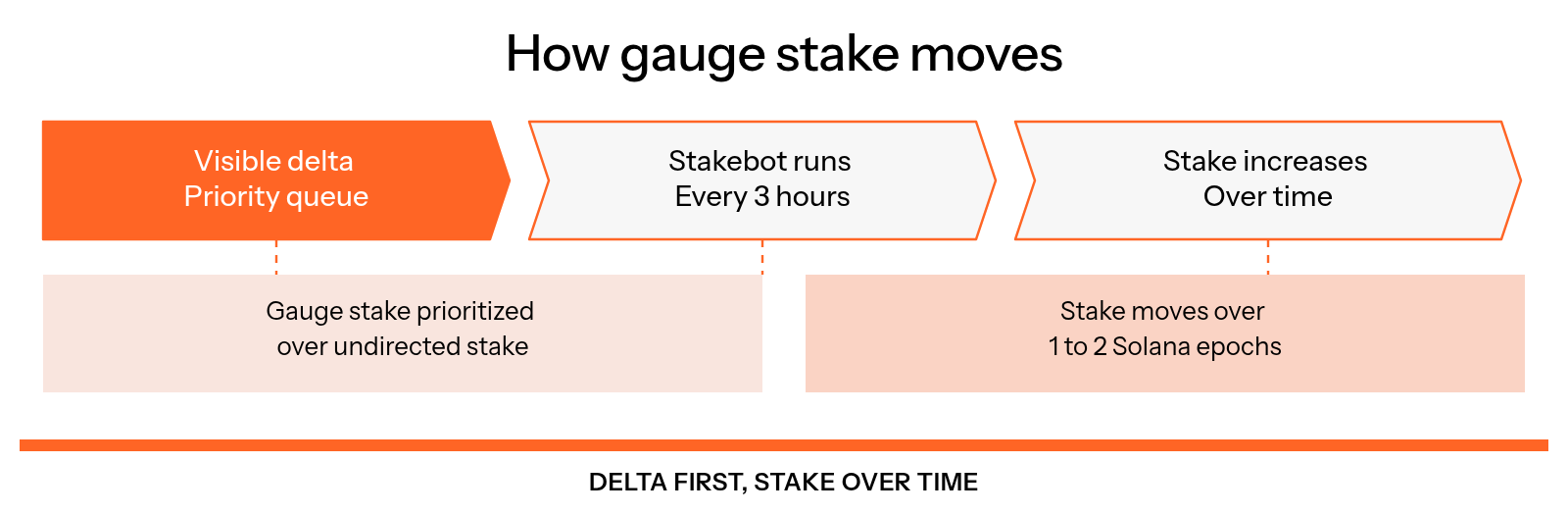
Figure 9.19: How gauge stake moves
Solution
Remain patient and monitor your validator page for updates.
Vote buying window is closed on Votex
Why this happens
Voting closes on the final day of each voting epoch. This allows votes to be finalized before the next epoch begins.
What to do
To buy votes in the next window:
Check the next epoch start
Check the next epoch start time on The Vault's Gauges page.
Wait for the new epoch
Wait for the new epoch to begin. The voting window will reopen and remain open for six days.
Buying votes closes on the 6th day. Buying votes early in the epoch helps avoid missing the window.
I only voted for one week and returns were minimal
Why this occurs
- Gauge impact compounds over time.
- Week one establishes voting position.
- Week two delivers full impact.
- Week three provides optimal sustained results.
Recommended approach
- Commit to two or three consecutive weeks.
- Plan budget across multiple epochs.
- Evaluate ROI over multiple weeks rather than a single epoch.
Planning formula
Minimum investment = weekly vote cost × 3.
Expected return = stake × commission × APY × 3 ÷ 52.
Stake disappeared after the epoch ended
Possible causes
- Votes were not renewed for the next epoch.
- Gauge votes last only one week.
- Other validators outbid your voting power.
- Stakebot rebalanced stake due to delta changes.
Solution
Buy votes consistently every epoch to maintain gauge stake.
Unsure when to buy votes
There are two different systems involved:
- Voting epochs last seven days and determine when votes count.
- Solana epochs currently last about 32 hours. Once a voting epoch has started, the stakebot moves stake to the new targets over the following Solana epochs.
Clear sequence
Follow this order:
Check the current voting epoch
Check the current voting epoch on The Vault's Gauges page.
Buy votes in the open window
Buy votes during the six day open window. Votes apply to the next voting epoch.
Wait for your stake
Deltas appear within three hours of the new epoch start. The stakebot then moves stake over the following Solana epochs, usually 1 to 2.
Example
Votes purchased during Epoch 20 apply to Epoch 21. The delta appears when Epoch 21 begins and stake is distributed over the following days (Figure 9.20).
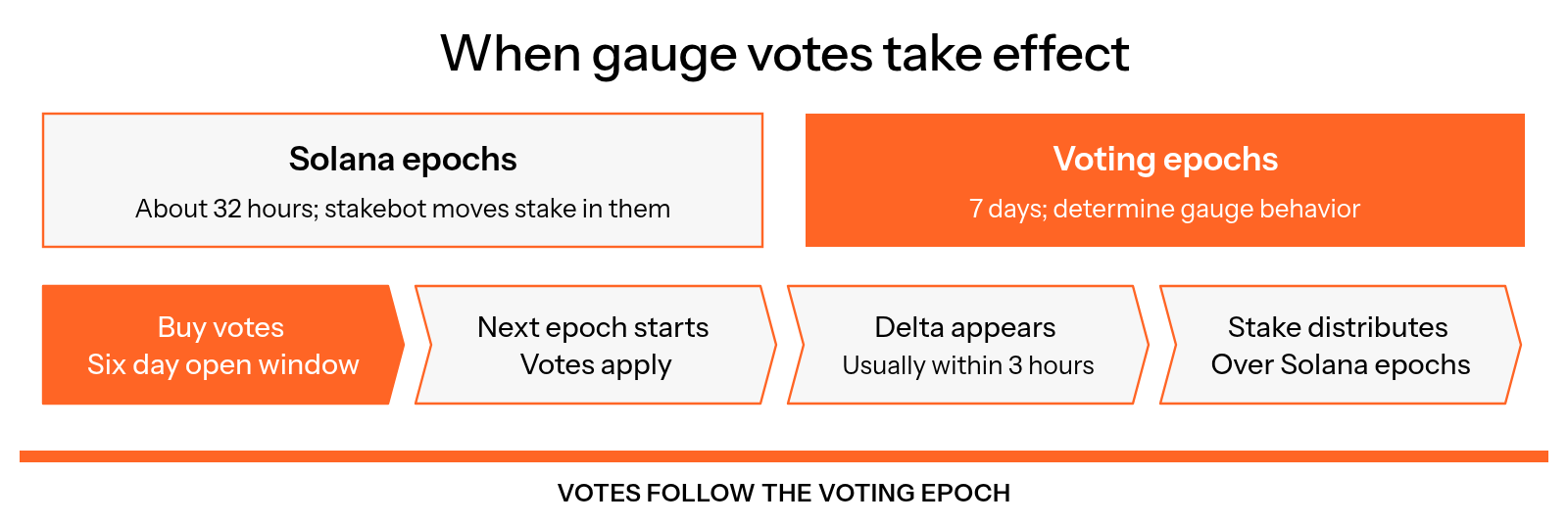
Figure 9.20: When gauge votes take effect
Wallet confusion
Wallet choice does not matter:
- Any wallet can be used.
- Different wallets may be used each week.
- Only the validator address and amount spent are relevant.
ROI uncertainty
How to estimate returns
Voting power = your spend ÷ total epoch spend.
Expected stake = total pool stake × voting power.
Weekly earnings = stake × APY ÷ 52 × commission.
Weekly cost = vote spend.
Evaluate performance across two to three weeks for accuracy.
Validator not showing as eligible
Minimum requirements
- Acceptable commission rates.
- Strong uptime and performance.
- Compliance with The Vault baseline standards.
Some segments require board review, while gauge participation itself is permissionless.
Solution
Verify validator metrics and contact The Vault team if eligibility appears incorrect.
Dashboards not updating
Common causes
- Cached data in the browser. Perform a hard refresh.
- Data synchronization delays across analytics sources.
- The stakebot has not run yet.
Solution
Wait three to six hours and recheck after refreshing.
Validator names show as token addresses
Why this happens
An ad blocker, antivirus or firewall can block the storage service that hosts validator names and logos, so the gauge list shows token addresses instead.
Solution
Allow the site in your blocker, or try another browser or device, then reload the page.
Gauge stake taking longer than expected
Possible reasons
- Initial large stake movements.
- High queue volume.
- Gradual redistribution designed to protect APY.
Expected indicators
- Delta visible on dashboard.
- Gradual stake increases over time.
- Full allocation by the end of the epoch or shortly after.
Solution
Continue voting weekly. Distribution speed improves in future epochs.
Still stuck
Review the Votex quick start guide and the Gauges page. If needed, contact support in The Vault Discord with the following information:
- Validator address
- Epoch number
- Transaction hash if available
- Relevant screenshots