🚀 Votex quick start guide
Get started with gauges fast.
This guide gives validators a practical understanding of how The Vault gauges work and how to use them effectively with Votex in under five minutes.

What you need to know in 5 minutes
Gauges allow validators to receive stake through a weekly voting mechanism. Validators acquire voting power, votes are cast, and stake is distributed for the following epoch. This process repeats weekly.
What gauges are
Gauges are a vote based stake allocation system:
- Validators acquire voting power.
- Votes are cast for a specific epoch.
- Stake is distributed based on vote share.
- Votes expire after one week and must be renewed.
This creates a predictable, transparent way to attract stake through market pricing.
Key numbers at a glance
- Voting epochs last 7 days.
- A minimum commitment of 2 to 3 weeks is recommended.
- The stakebot runs every 3 hours.
- Initial impact is visible after one week when using Votex.
- Delta updates appear within 3 hours of a new epoch starting.
- Stake moves over the following 1 to 2 Solana epochs after the new gauge epoch starts.
Follow the quick process
Buy votes
- Visit https://votex.so/daos.
- Confirm voting is open. Voting is available six days per week and closes on the final day of the epoch.
- Purchase votes for your validator, as shown in How to buy gauge votes. Any wallet can be used and it does not need to remain consistent week to week.
Wait for the next epoch
Check the Gauge cycle timeline on The Vault's Gauges page. Votes always apply to the next epoch after purchase, so wait for it to start. Gauge epochs last one week and don't line up with Solana epochs.
Example: votes purchased during Epoch 20 apply to Epoch 21.
Check your delta
- Visit https://thevault.finance/validators.
- Locate your validator and review the delta column.
Deltas typically appear within three hours of the new epoch starting.
Wait for stake distribution
Continue monitoring your validator page for updates. Once the gauge epoch is set, the stakebot moves stake to the new targets over the following Solana epochs. Stake is processed through a priority queue. First time or large stake allocations may take slightly longer.
Repeat weekly
Votes only last one week. To retain or grow stake, you must vote again for the next epoch. Most validators see the strongest results after two to three consecutive weeks.
Example timeline
- Day 0, Monday: votes are purchased during Epoch 20.
- Near the end of Epoch 20: Votex casts votes on your behalf.
- Day 7, Monday: Epoch 21 begins.
- Within 3 hours: your delta appears on the dashboard.
- From Day 7: the stakebot moves stake to the new targets over the following 1 to 2 Solana epochs.
- Day 14: votes must be renewed for Epoch 22 (Figure 10.18).
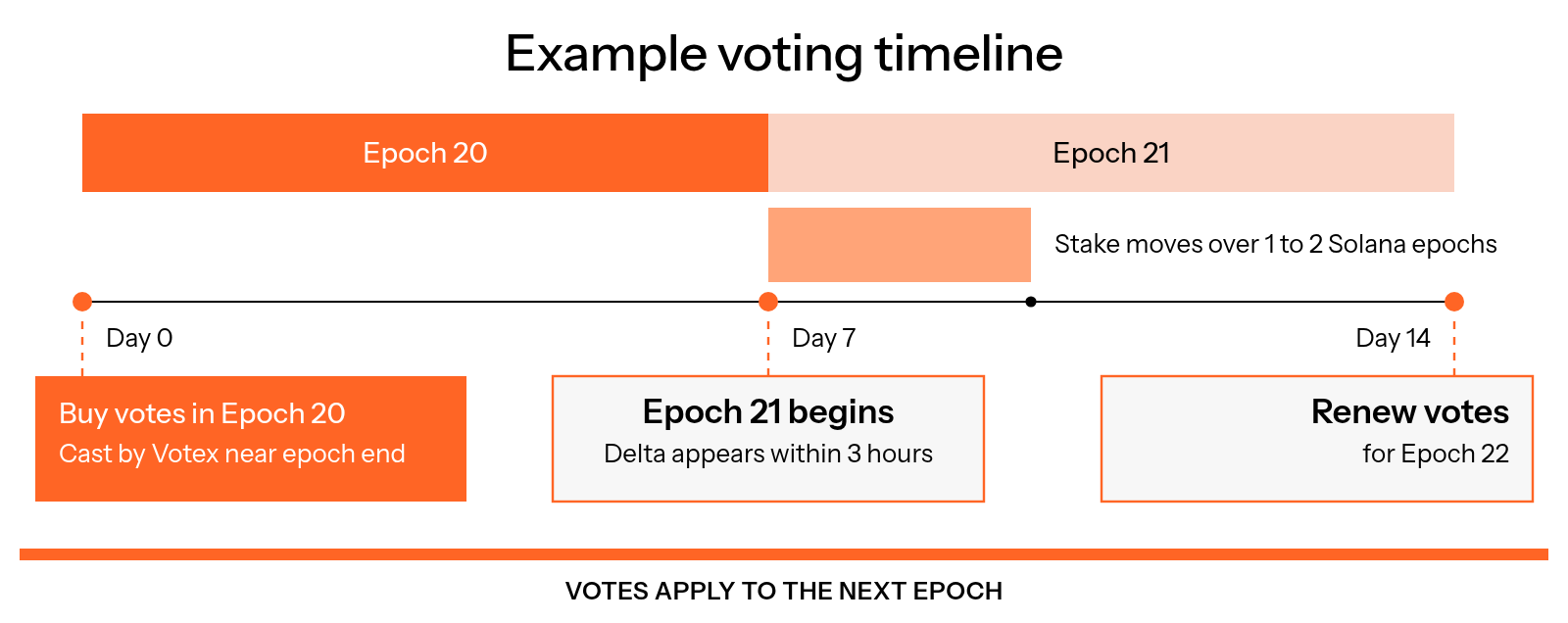
Figure 10.18: Example voting timeline
Stake priority rules
Stake is processed in the following order (Figure 10.19):
- First priority: direct stake combined with gauge stake.
- Second priority: undirected stake.
Within each priority tier, validators with larger deltas are processed first.
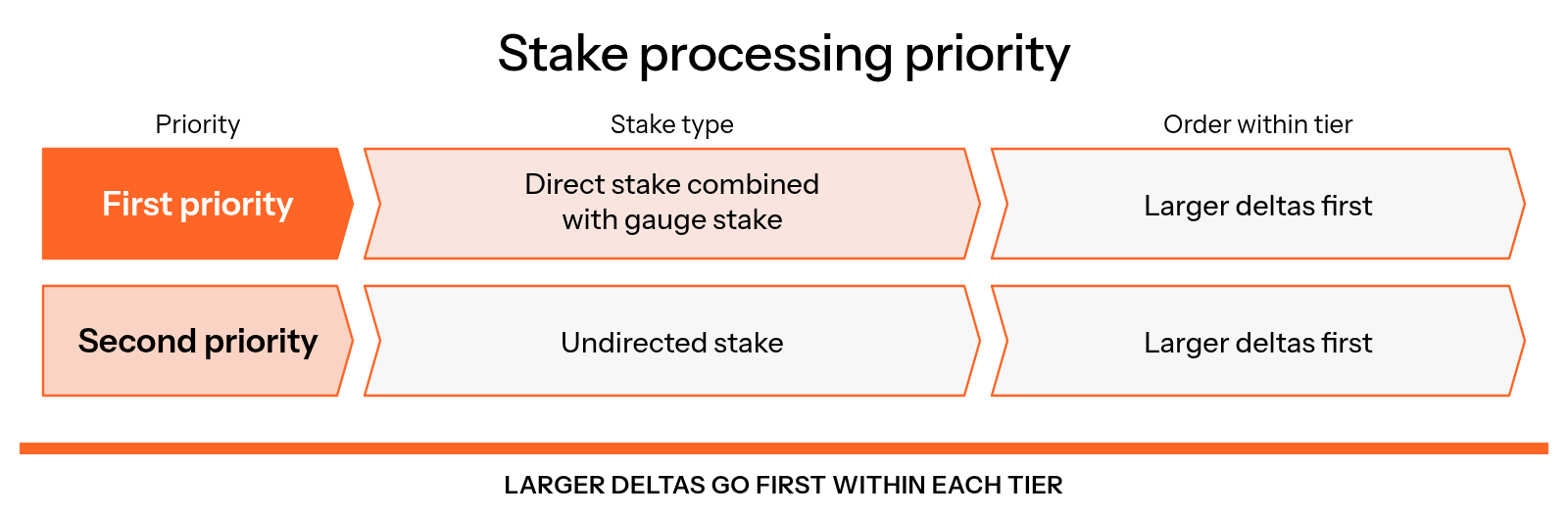
Figure 10.19: Stake processing priority
Budget planning and ROI
Estimating returns
Expected earnings = stake amount × commission rate × APY ÷ 52.
Cost = USDC spent on votes.
If expected earnings exceed cost, the strategy is profitable.
Understanding voting power
Your voting power = your spend ÷ total spend for the epoch.
Example: $1,000 ÷ $1,200 total spend = 83% of voting power.
Common mistakes to avoid
- Only voting for one week and stopping before results compound
- Expecting instant stake distribution
- Forgetting to vote again when a new epoch begins
- Confusing Solana epochs with gauge voting epochs
- Assuming the same wallet must be used every week
Quick links
- Buy votes: https://votex.so/daos
- Check epoch timing: https://thevault.finance/gauges
- View validator deltas: https://thevault.finance/validators
- Stakebot transparency data: https://github.com/SolanaVault/stakebot-data
- Analytics dashboard: https://dune.com/kagren0/the-vault-validators
Need help
For deeper explanations, review the Gauges documentation. If you still need assistance, reach out to support in The Vault Discord directly.
Ready to start
Visit https://votex.so/daos, purchase your first votes and begin participating in gauges.