🎮 Game events
Find hosted community events, join a game and record your attendance.
Community hosts run games and social events in The Vault Discord. The event listing tells you when to join, where to meet and what you will play. For the automated daily battles and solo quests, see Colosseum and adventures.

Find the current schedule
Open the server's Events list or the weekly schedule in the war room. Discord event listings show the scheduled time and location. The announcement bot also posts reminders about 1 hour before scheduled events.
Check the current listing and the host's latest message before joining, especially if an event has moved or been cancelled. Use the date and timezone shown in Discord when planning your attendance.
Games and social activities
Hosts can currently schedule these activities. Availability varies by week, so the catalog does not mean every game runs on a fixed schedule.
- Word, drawing and guessing games: Clues and Guesses, Codenames, Gartic, GeoGuessr, Is It Cake?, Stopots and You Know What I Meme.
- Competitive games: Battleship, Bingo, Galaxy Games, Goober Dash, Land.io, Poker, Rocket Bot and Stumble Guys.
- Host-selected games: Dealer's Choice and Surprise Game, with the game explained by the host.
- Social events: Karaoke, Movie Night, Weekly Check-In and Monthly Check-In.
Join a hosted event
The host provides the game link, room code or channel instructions. If the host opens attendance tracking, your attendance entry is separate from marking interest in the Discord event (Figure 19.12).
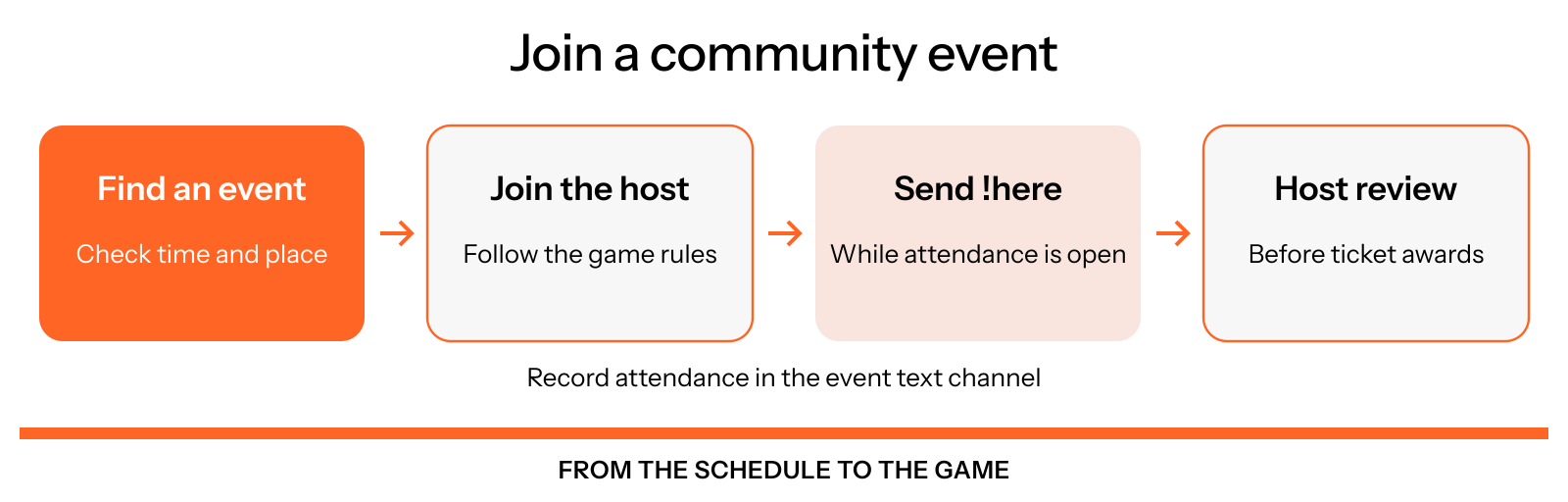
Figure 19.12: Joining an event and recording attendance
Follow the event's instructions when it starts:
Open the event details
Check the time, location and any preparation requested by the host. The listing or host message provides the place to join.
Join the game
Go to the announced channel or game room and follow the host's instructions. The host explains the format and any participation or winner rewards.
Record your attendance
When the host opens attendance, send !here in the event's text channel. The bot reacts when it records a new entry. Attendance commands do not work in threads or when attendance is closed.
Correct an accidental entry
If you entered attendance by mistake, send !undo in the same channel while attendance is still open. Contact the host if you need a correction after it closes.
Attendance and rewards
The host reviews the attendance list and processes any ticket awards. Reward amounts depend on the event and the host's announced rules. A Discord RSVP or an attendance entry does not by itself guarantee a prize.
After tickets are awarded, use /inventory in the items channel to check your balance. See Discord economy for tickets and weekly resets, and Squads for how tickets contribute to team competition.
For a missing attendance entry or event reward, contact the host with the event name, date and the channel where you participated.
Become a host
Majors are the community's event hosts. They use the event calendar and attendance tools to organize activities. Ask the community team about hosting opportunities and current requirements. See Community roles for the Major role and other community responsibilities.