☀️ How to use delayed unstaking with Solflare
Unstake vSOL at the full pool rate with a delayed unstake, then turn the stake account into SOL in Solflare.
A delayed unstake gives you the full pool value of your vSOL, minus a 0.1% fee, but not straight away.

Need your SOL right now? Use Instant unstake instead. It swaps vSOL for SOL immediately through the Unstake Pool, for a small fee. See How to unstake your LST.
If you use Phantom, see How to use delayed unstaking with Phantom.
Unstake your vSOL
The Vault sends your SOL to one or more stake accounts in your wallet. You then unstake those accounts in Solflare, wait for the current Solana epoch to end, and withdraw the SOL (Figure 3.18).
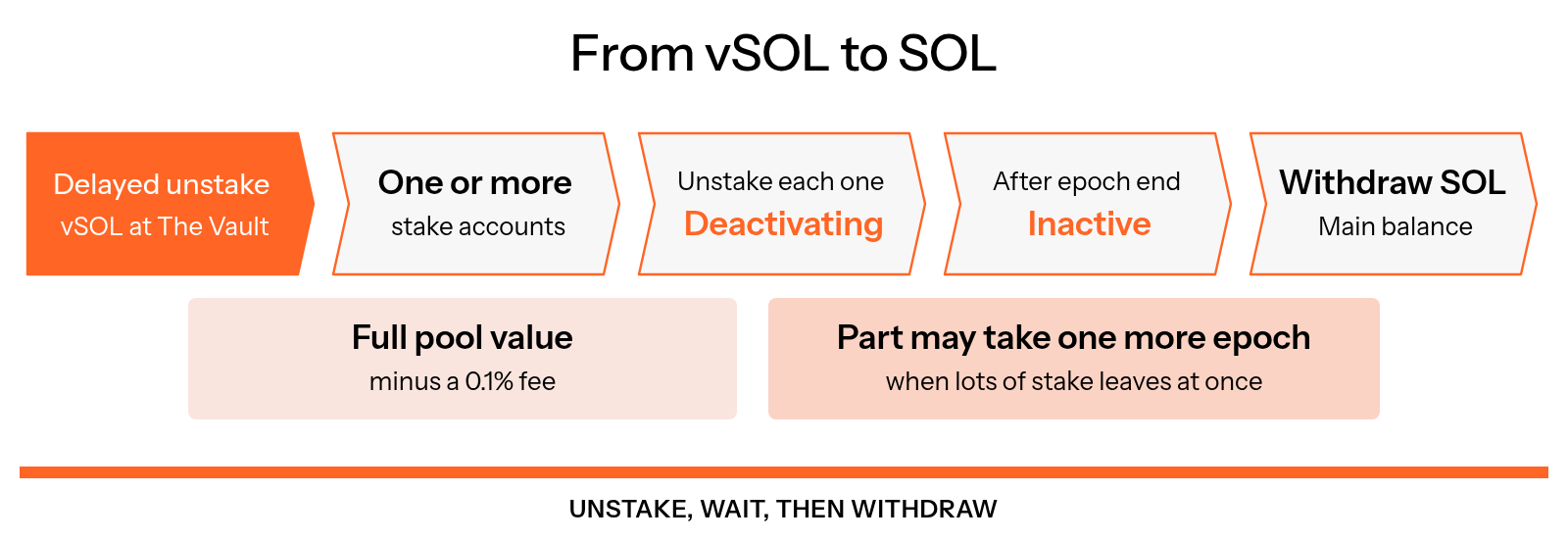
Figure 3.18: From vSOL to SOL
Start a delayed unstake on The Vault
- Go to thevault.finance and tap Open dapp. The first time, tick both boxes and tap I Agree.
- On the Stake page, open the Delayed unstake tab.
- Enter how much vSOL to unstake.
- Tap Connect Wallet, choose Solflare, and approve the transaction in Solflare.
You receive your SOL in one or more stake accounts. Larger amounts can be split across several stake accounts, so Solflare may ask you to approve more than one transaction.
Unstake each stake account in Solflare
- Open the Portfolio tab and choose Stake.
- Select an Active stake account from your delayed unstake.
- Select Unstake and confirm the transaction.
The stake account now shows Unstaking. Select it to see Solflare's estimate of the time left. Repeat these steps for every stake account you received.
Wait for the epoch to end
A stake account finishes unstaking when the current Solana epoch ends. An epoch currently lasts about 32 hours, so the wait is anywhere from a few minutes to about a day and a half, depending on when you unstaked. You can follow epoch progress on Solana Explorer or solanabeach.io.
Network-wide deactivation limits can make the process span additional epochs. Use the stake account's status and your wallet's estimate instead of assuming the next epoch is guaranteed.
Withdraw your SOL
- Open the Portfolio tab and choose Stake.
- Select the stake account once it has finished unstaking.
- Select Withdraw and confirm the transaction.
The SOL moves to your main Solflare balance. Repeat for each stake account.
Good to know
- Unstake first: SOL can only be withdrawn once a stake account has finished unstaking. A stake account you have not unstaked stays delegated to its validator.
- Fees: creating stake accounts requires a refundable rent deposit, and each transaction has a network fee. Keep enough SOL for the amounts shown by the wallet, especially when a withdrawal creates several accounts.
- Instant or delayed: instant unstaking depends on available liquidity and the current quote. Delayed unstaking withdraws at the pool rate, less the withdrawal fee, into stake accounts. Withdraw SOL only after those accounts finish deactivating.
- Solflare's Instant Unstake: if offered for the account, this can exchange the stake account for SOL without waiting for deactivation. Review Solflare's current fee and liquidity quote before approving.
⚖️ Direct stake vs undirected stake
The two kinds of stake in The Vault: who chooses the validator, how each is allocated, and what it means for validators and vSOL holders.
👻 How to use delayed unstaking with Phantom
Unstake vSOL at the full pool rate with a delayed unstake, then turn the stake account into SOL in Phantom.