🗝️ The Vault tab
Stakebot targets, target composition, invoices, and gauge and Multiply calculators for The Vault.
The Vault tab is built for validators that receive stake from The Vault stake pool, or plan to. It has three sub-tabs along the top: Vault, Gauges and Multiply.

Vault
The Vault sub-tab shows where your validator stands with the pool (Figure 17.8):
- Stakebot target: how much SOL The Vault's stakebot aims to delegate to you this epoch, how much is already active from the pool, and any pending move.
- Eligibility badges: the Meets criteria and On allow list badges show whether you currently qualify for pool stake. On allow list means your validator is on The Vault's approved list. See Delegation requirements.
- Target composition: how your target splits between Directed, Bonus, Gauges and Performance stake.
- V-pool status: whether you have opted in to the Community Pool, your gauge binding and your invoice eligibility. If you haven't opted in, a link takes you to opt in.
- V-pool votes: your share of the Community Pool's votes each epoch.
- Invoices: your Stake-as-a-Service invoices, with a separate V-pool ledger next to them for your Community Pool invoices. Invoices show in vSOL or VLP, with the total outstanding for each token at the top. Each epoch shows Paid or Unpaid, the amount, the stake it covers, and whether it is settled or still due.
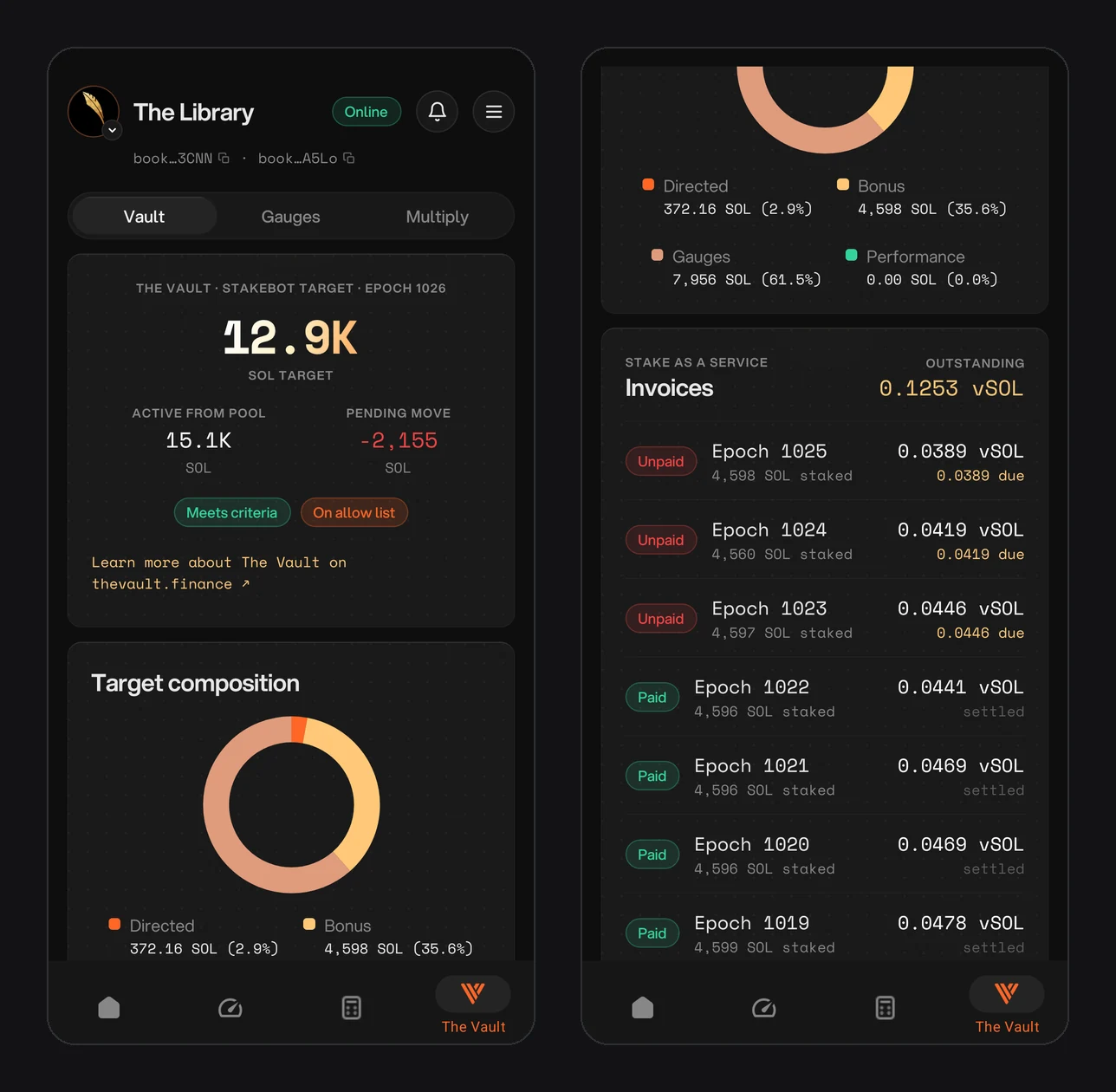
Figure 17.8: The Vault sub-tab: stakebot target, eligibility badges, target composition and Stake-as-a-Service invoices
Gauges
The Gauges sub-tab is a calculator for winning stake through gauges. You lock $V for veV voting power and vote to direct the gauges reserve, 10% of the pool's undirected stake, to your validator each weekly gauge epoch, in proportion to the votes you win (Figure 17.9).
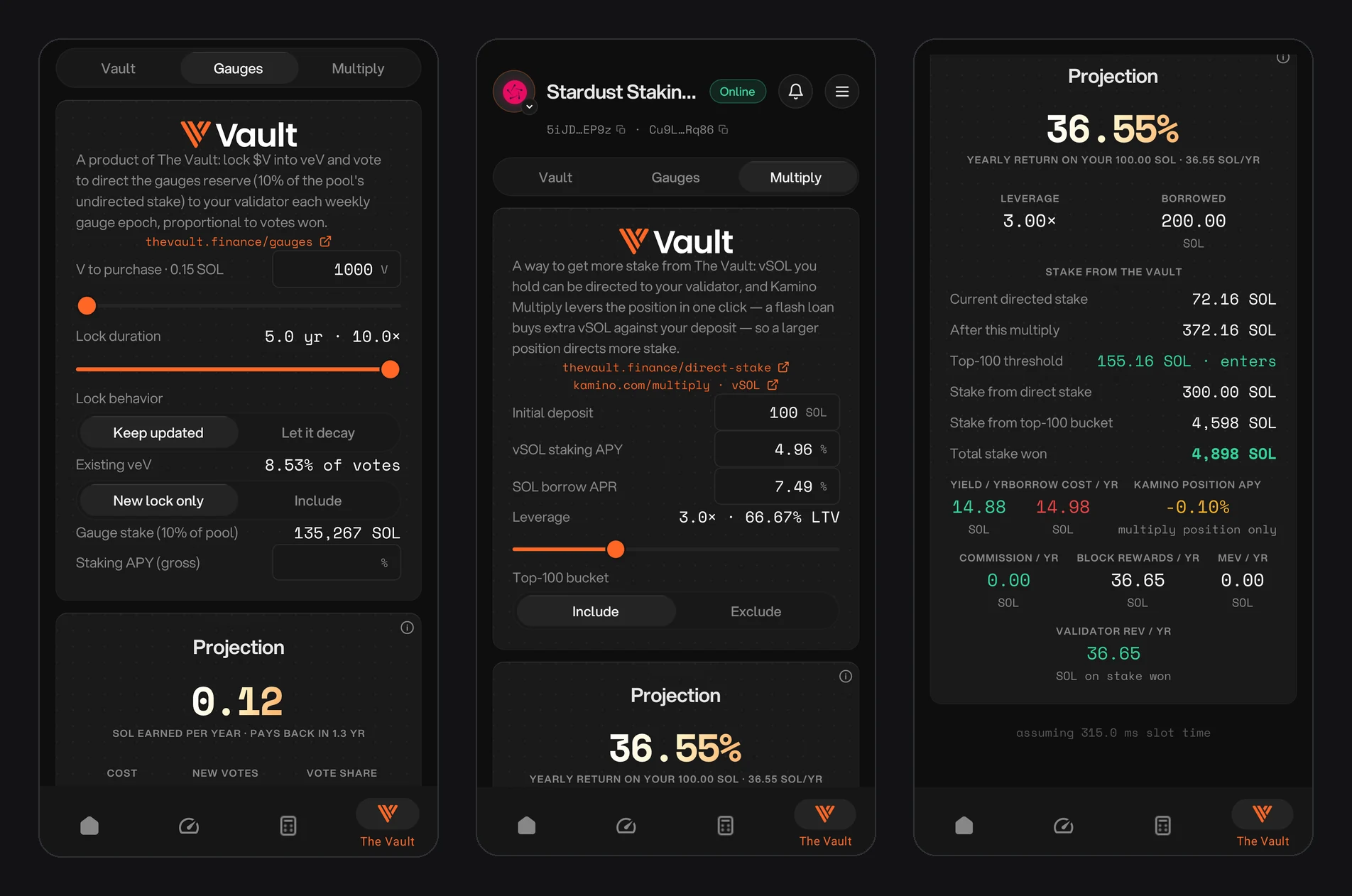
Figure 17.9: Gauges calculator, and the Multiply calculator with its projection
The calculator takes these inputs:
- V to purchase: how much $V to buy, with its cost in SOL.
- Lock duration: up to 5 years for the maximum 10× multiplier.
- Lock behavior: keep the lock updated, or let it decay.
- Existing veV: the share of votes you already hold. Choose whether the projection counts only the new lock or includes what you have.
- Gauge stake: the gauges reserve, 10% of the pool's undirected stake.
- Staking APY: the gross APY to assume for the stake you win.
Projection shows the SOL you would earn per year and how long the lock takes to pay back, with the cost, new votes, vote share, gauge stake won, and yearly commission, block rewards and MEV.
Multiply
vSOL you hold can be directed to your validator. Kamino Multiply levers that position in one click, using a flash loan to buy extra vSOL against your deposit, so a larger position directs more stake to you. The Multiply sub-tab models that loop:
- Inputs: initial deposit (SOL), vSOL staking APY, SOL borrow APR, leverage (with its loan-to-value) and whether to include the top-100 bucket.
- Projection: the yearly return on your deposit, leverage and amount borrowed, and the stake you would win from The Vault. That covers your current directed stake and the total after the multiply, the top-100 threshold and whether you would enter it, stake from direct stake and from the top-100 bucket, and total stake won.
- Earnings: yearly yield, borrow cost and Kamino position APY, plus the commission, block rewards and MEV the stake you win would bring in.
The top-100 bucket refers to The Vault's Direct Stake Leaders bucket. The top 100 eligible approved validators by directed stake share 40% of undirected stake equally.
Multiply uses leverage. If the SOL borrow rate rises above vSOL's yield for long enough, or collateral value drops, the position can lose value and be liquidated. Read the Kamino Multiply risk disclosure before opening one. The app's figures are projections, not promises.
Community Pool invoices and rewards
The Community Pool has a separate 75% fee and three-unpaid-invoice cap. Its contract settles in VLP. The V-pool ledger shows your Community Pool invoices and what you still owe in VLP, and invoice alerts tell you when one is unpaid. The app doesn't pay invoices: follow How to pay Community Pool invoices.
The Gauges calculator describes a validator allocation projection. It is not a Community Pool delegator yield quote. Pool holders use the website to delegate, record snapshots and claim VLP. First rewards can take approximately two weeks.